How to Publish a Website: Hosting by Route, and What It Costs After Year One
In this lesson
How to publish a website depends on one thing: how you built it. Made it in a website builder? You are already hosted, and publishing is a setting you switch on. Made it in WordPress? You rent space on a server from a hosting company. Wrote the files yourself? A free static host can serve them, as long as its terms allow what your site does.
That is the honest answer to how to host a website, and this lesson takes each route in turn before pricing the one that costs real money. Every price was read from the vendor's US pricing page on 12 October 2026 unless a different date is shown next to it.
First, work out which route you are on
Hosting means a computer that stays switched on, stays connected, and is set up to answer whenever someone types your domain. You do not need one of your own. What changes from route to route is who rents that computer for you and how much of its upkeep lands on your desk.
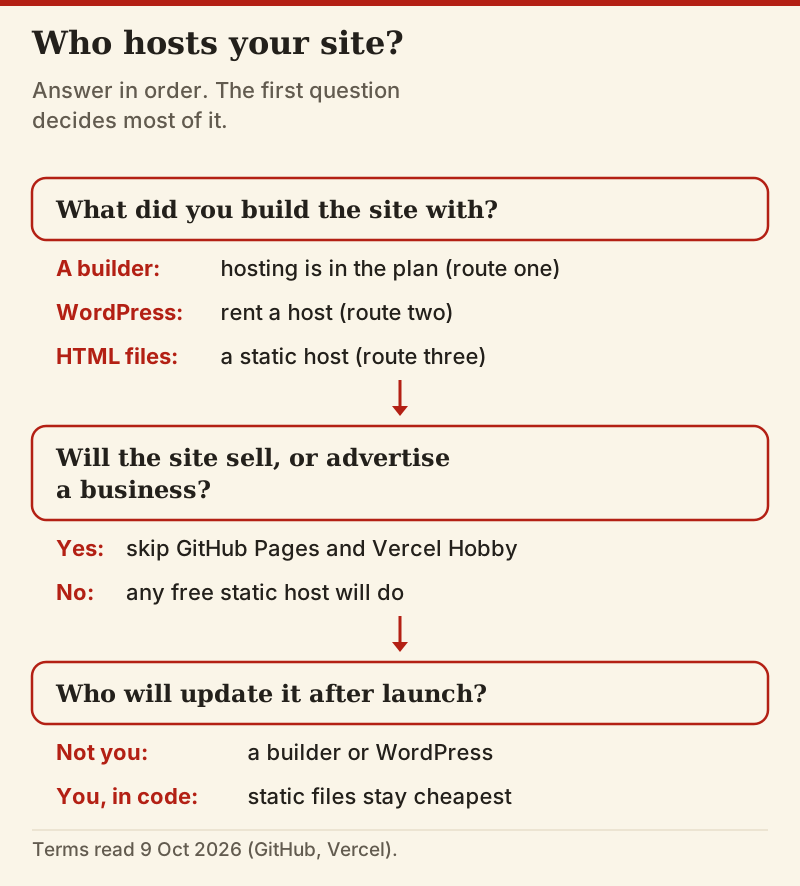
If you are still choosing between the three, the lesson on picking your path settles it on maintenance rather than features. Come back here once you know which one is yours.
Route one: a website builder already includes hosting
Squarespace, Wix and the rest are hosting companies with an editor on top. The subscription pays for the servers, the security certificate and the software updates, and you never see any of it. There is nothing to install, and the only thing you point anywhere is your domain.
Publishing on this route is a visibility setting. Squarespace is a good example of how strict that setting can be: a trial site stays private for all 14 days, other visitors land on an owner login page, and the only way to show it to a friend is a site-wide password. Going public needs a paid plan: Basic is $19 a month billed annually, or $25 if you pay month to month. Wix's cheapest plan without its ads, Light, was $17 a month billed yearly as of 9 October 2026.
The trade is that you never own the hosting. A builder site cannot be lifted onto another host; it can only be rebuilt somewhere else. For most small sites that is a fair price for never thinking about servers, and it is why a builder is the quickest way to put a website online.
Route two: WordPress on a rented host, step by step
WordPress itself is free software. It needs a server that runs PHP and a database, which is exactly what shared WordPress hosting sells. We use SiteGround as the worked example of the category, because its pricing page states the intro and renewal rates side by side; any reputable shared host follows the same five steps.
- Pick a plan sized to the site. SiteGround's StartUp holds one website and is pitched at around 10,000 visits a month; GrowBig allows unlimited sites and about 100,000 visits. A first site belongs on the smallest plan.
- Register or point the domain. SiteGround includes one domain free for the first year. If you already own a name, change its nameservers or A record to the values the host gives you.
- Install WordPress. Shared hosts do this from a setup wizard, and SiteGround lists free WordPress installation among its standard features.
- Switch on HTTPS. SiteGround sets up a free certificate automatically for each site; confirm the padlock appears before you share the address.
- Publish. Turn off any coming-soon or maintenance mode, then load the site on a phone using mobile data to see what a stranger sees.
If that is your route, SiteGround's StartUp plan is a sensible first host for a single WordPress site. That is an affiliate link; the lesson would recommend the same category without it. Read the next section before you pick a plan, because the price on the button is not the price you will keep paying.
What the hosting plan really costs: intro price vs renewal
Shared hosting is sold on a first-term discount. The monthly figure in large type applies to the first prepaid term only; after that the plan renews at the regular rate. On SiteGround's US page every plan was prepaid for 12 months, with a 30-day money-back guarantee.
| Plan | First term | Renews at | Year one | Year two | Sites |
|---|---|---|---|---|---|
| SiteGround StartUp | $2.99/mo, 12 months prepaid | $17.99/mo | $35.88 | $215.88 | 1 |
| SiteGround GrowBig | $4.99/mo, 12 months prepaid | $29.99/mo | $59.88 | $359.88 | Unlimited |
| SiteGround GoGeek | $7.99/mo, 12 months prepaid | $44.99/mo | $95.88 | $539.88 | Unlimited |
| Squarespace Basic (builder, hosting included) | $19/mo billed yearly | $19/mo | $228 | $228 | 1 |
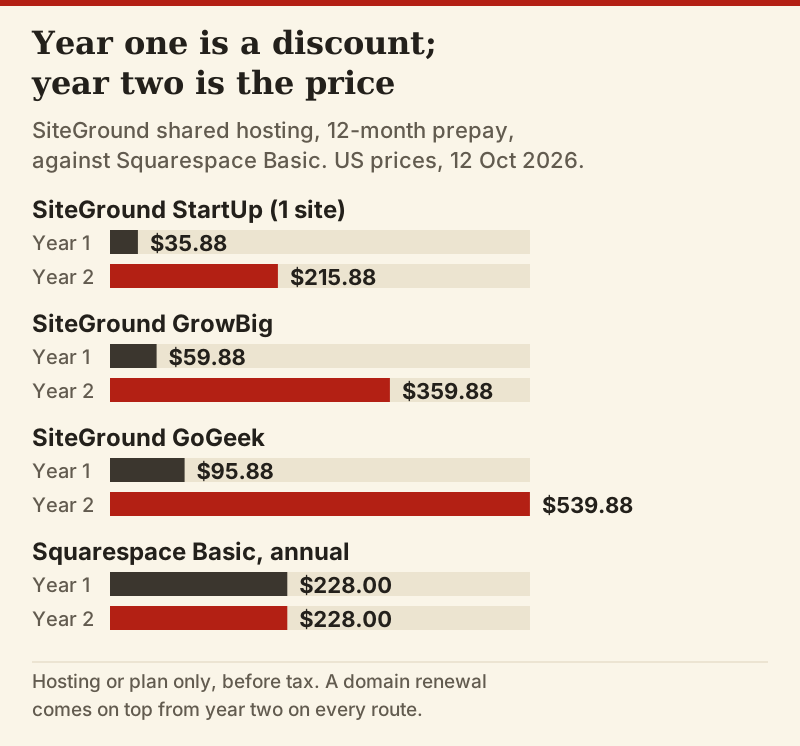
The second bar in each pair is the real price of the hosting; the first is a reward for signing up. StartUp renews at about six times its intro rate, so a single WordPress site costs $215.88 a year in hosting from year two, close to the $228 of a Squarespace Basic plan, and both routes still need a domain renewal on top. That does not make WordPress the wrong choice. It means the cheap route is only cheap for twelve months, and the full cost lesson carries the same comparison out to five years.
Two habits keep the renewal from ambushing you. Put the renewal date in your calendar a month early, since that is when switching hosts is cheapest. And before you pay, check which billing terms the host offers, because a longer first term delays the jump without removing it.
Route three: static files on a free host, and the terms that rule out a business
If your site is a folder of HTML, CSS and images, as it is after the HTML and CSS lesson, it needs no database and no server software at all. Static hosts copy those files onto a global network and serve them as they are, and several do it for nothing. Free is genuinely free here; the limits live in the terms, and two of the best-known free tiers rule out the use most readers have in mind.
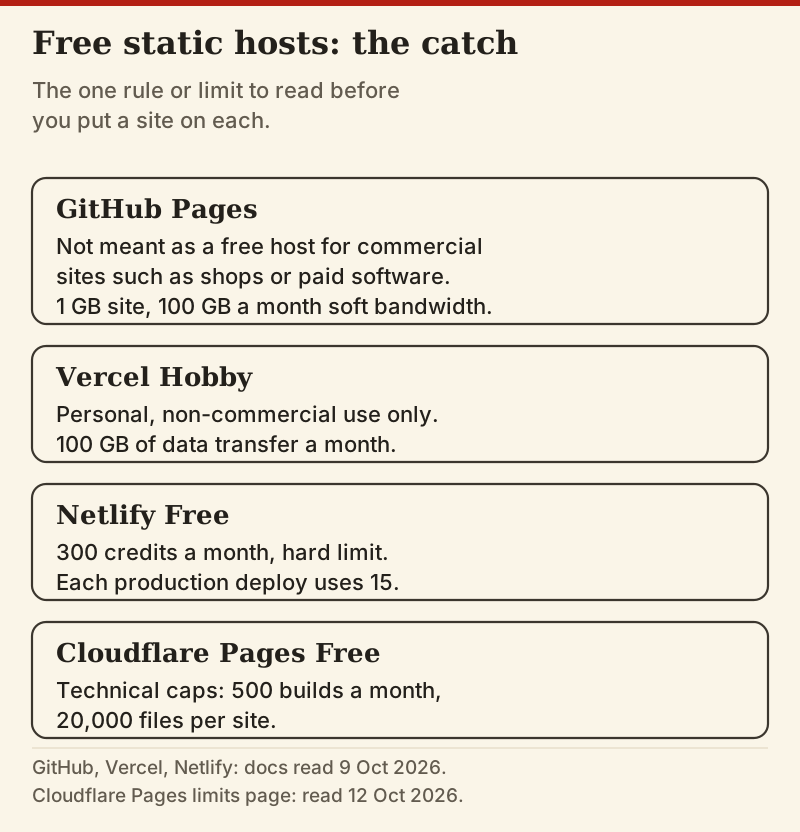
GitHub's own limits page says GitHub Pages is not intended as a free host for commercial sites such as online shops or software sold as a service. Vercel's Hobby plan is for personal, non-commercial use only. Netlify meters its free plan in credits: 300 a month as a hard limit, with each production deploy using 15, as of 9 October 2026. Cloudflare Pages sets technical caps on its free plan instead, which on its limits page today are 500 builds a month and 20,000 files per site.
So the rule is short. A portfolio, a club page or a class project can live on any of them. A site that sells something, or advertises a business, needs a host whose terms you have actually read and that permits it, whether that is a free tier, a paid tier of the same service, or ordinary shared hosting, which serves static files perfectly well.
How to publish a website on each route: the moment it goes live
On a builder, going live is a switch. You move to a paid plan, set the site to public and connect your domain in the builder's own settings, and the change is visible as soon as the domain resolves.
On WordPress, the site is live from the moment your domain points at the host and the host answers; publishing an individual page after that is the button in the editor. The delay people complain about is DNS caching, which is why the domains and DNS lesson has you lower the TTL the day before you switch.
On a static host, every upload of new files is a deploy, and the site changes when the deploy finishes. The first deploy hands you an address on the host's own domain, which you can share straight away. Your own domain comes afterwards, through the host's custom-domain settings and a couple of DNS records. Whatever the route, end with the same check: the site on a phone, logged out, on mobile data.
Hosting a website on your own computer: why not yet
You can host a website on a spare computer at home, and doing it once teaches a great deal. It is a poor way to publish one. The machine has to stay on and connected every hour of the year, your home connection's public address can change unless you pay for a fixed one, and every security update for the operating system and the web server becomes your job. Read your broadband contract too, because a home line is sold for browsing and some providers' terms do not allow you to run servers on it.
If you want the learning without the risk, run a local server for practice and publish the real site on one of the three routes above.
Edge cases
Most sites fit one route cleanly. These are the situations that do not.
- You pay for a builder and want WordPress as well: that is two hosts and two bills. Keep the domain in one place and point it at whichever site is the live one.
- Your static site needs a contact form: a static host serves files, not form handlers, so add a form service or pick a host with forms built in.
- You want to sell: rule out GitHub Pages and Vercel Hobby, then price a builder's commerce plan against shared hosting with a shop plugin.
- The renewal invoice has arrived: moving WordPress to a new host is a backup, a restore and a DNS change, and it is cheapest done before the renewal date rather than after it.
Where this sits in the course
This is the publishing step of the full guide to making a website. If you have not registered a name yet, do the domains lesson first; if you have, the next job is the checklist to run before you hit publish.
Publishing and hosting: short answers
Do I need hosting for a website builder?
Can I host a website for free?
How much does web hosting cost per month?
What is the difference between a domain and hosting?
How long does it take for a website to go live?
Before you move on
- You can say which of the three routes your site is on.
- On WordPress, you know your host's renewal price, not only its first-year price.
- On a static host, you have read its terms for business use.
- Your domain points at the host and the padlock shows in the address bar.
- You have opened the live site on a phone, logged out, on mobile data.
That’s the syllabus. Put it together with the complete path from zero to live.